Pages

Showing posts with label nokia. Show all posts

Tuesday, January 6, 2015

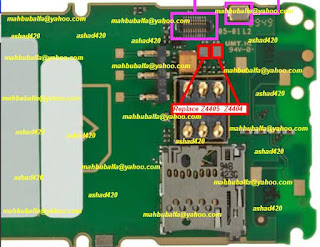
Nokia C5 03 Keypad Not Working Jumpers Repair Solution

Nokia C5-03 Keypad Not Working Jumpers Repair Solution,Nokia C5-03 Keypad Not Working Jumpers Repair Solution,Nokia C5-03 Keypad Not Working Jumpers Repair Solution

Read More..

Thursday, December 11, 2014

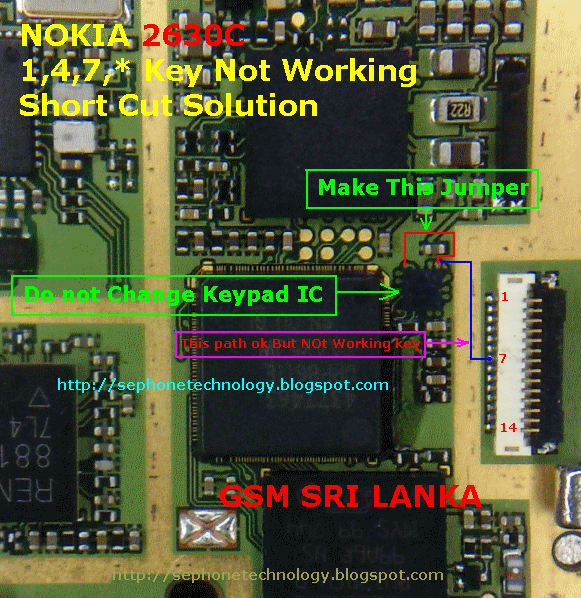
NOKIA 2630 1 4 7 Easy keypad solution


NOKIA 2630 1 4 7 Easy keypad solution

Read More..

Sunday, December 7, 2014

Nokia 5700 Lcd Display Light Solution Jumpers

Nokia 5700 Lcd Display Light Solution Jumpers
Read More..

Monday, November 24, 2014

Secret Codes for Nokia Mobile Phones

In this section, Phone Repairing will provide some free unlocking codes for Nokia mobile phones. Free codes that will be discussed below consists of a secret code to unlock the phones, to know the secret codes IMEI number, secret code to view the software version, secret codes to view private numbers and more.
Let us discuss one by one :
  1. Code to see the IMEI number is : press the button *#06#
  2. Code to view the software version, manufacture date and type of software compression : press *#0000# or if not work try : *#9999#
  3. Code to view call waiting status : press *#43#
  4. Code to view private number that contact your mobile phone : press *#30#
  5. Code to change the operator logo (especially for mobile phones Nokia 3310 and 3330) : press *#67705646#
  6. Code to show simlock status : press *#746025625#
  7. Code to set phone settings to factory settings : press *#7780#
  8. Code to show mobile phones serial number, production date, purchase date, recent repair date : press *#92702689#
  9. Code to show security code : press *#2640#
  10. Code to show bluetooth IP address : press *#2820#
  11. Code to activate EFR with the best sound quality : press *#3370#
  12. Code to activate EFR with lowest sound quality : press *#4720#
Read More..

Nokia 3110c MMC Problem

Are you users of the Nokia 3110c? The problems often encountered in mobile Nokia 3110c is the phone can not read MMC, or phone restart when installed MMC.

This can be overcome such as by flashing, but if you do not have Flasher box, you can use the following as alternative steps:


  1. Remove SIM Card

  2. Remove the MMC and Format MMC on your computer

  3. Turn on the phone without SIM Card and MMC

  4. Return the phone settings to factory settings

  5. Enter the MMC, and then format MMC by phone, then reset the phone

  6. Then insert the SIM card, then reset the phone

  7. Mobile return to normal
Read More..

Sunday, November 23, 2014

Nokia N70 Camera way


Nokia N70 Camera way

Read More..

Friday, November 21, 2014

Wednesday, November 19, 2014

Nokia 1202 1203 1661 1662 no network solution

Nokia 1202 No Network Solution
Nokia 1203 No Network Solution
Nokia 1661 No Network Solution
Nokia 1662 No Network Solution
Read More..

Nokia 3110c Sim Layout missing jumper ways


Nokia 3110c Sim Layout missing jumper ways

Read More..

Nokia E7 Speaker Ways Solution


Nokia E7 Speaker Ways Solution
Read More..

Nokia C2 03 C2 06 C2 08 Insert Sim Solutions By Jumpers

Nokia C2-03,C2-06,C2-08 Insert Sim Solutions By Jumpers
Nokia C2-03,C2-06,C2-08 Insert Sim Solutions 
Nokia C2-03,C2-06,C2-08 Insert Sim Problem
Nokia C2-03,C2-06,C2-08 Insert Sim Jumper Ways

Read More..

Tuesday, November 18, 2014

Nokia 7230 earpiece speaker repair solution

Heres the solution for Nokia 7230 Earpiece speaker problem. This solution may help fix and repair if there is no audio sound can be heard over the earpiece speaker.

The solution below shows the two filter coils and a ESD protection resistor that needs to be check or replace if the earpiece speaker is working okay and the flex cable wire is also well and or already tried and replacing a new spare.
Nokia 7230 Eapiece Speaker No audio sound solution
nokia
The GAZOO IC holds the earpiece audio signal that being feeds to the earpiece speaker. If all corresponding components such as the speaker, flex cable and the filter coils showed on the above location, you may then suspect that the problem lies on a faulty GAZOO IC. Reworking it might possibly solved the problem
Read More..

Nokia 3110c Sim Layout missing jumper ways


Nokia 3110c Sim Layout missing jumper ways

Read More..

Nokia 5220XM Ringer Hands Free Loud Speaker No Sound Solution

Heres the solution for Nokia 5220 Xpressmusic Ringer and Integrated Hands Free (IHF) Speaker that No sounds output can be heard on it.
If ever encountered this problem, you need to check the earpiece speaker first if it already busted or damaged.
If the speaker is working okay but still there is no audio sound output can be heard when being activated, you may use this solution below to trace the line paths and check particular components on Nokia 5220 PCB board that holds the IHF speaker circuit. This solution covered for left and right channel speakers connection.
Nokia 5220 Xpressmusic Ringer and Hands Free Speaker No Sound Repair Solution
nokia
The IHF speaker left and right audio signal is feed from the power and audio IC (AVILMA) then filtered by a non polar capacitors before it feeds to the audio amplifier IC. The audio amplifier chip is the one that boosts or amplify the audio signals to make it sounds louder and better.
The boosted or amplified audio signal is then feeds across to a filter coils, bypass capacitors and an ESD protection resistors before it get through to the IHF Speakers.  Hints for Troubleshooting:
a) check the earpiece speaker first by using a multimeter.
b) clean the speaker terminals and contact pads.
c) check or replace the filter capacitors, filter coils and resistors if found damaged.
d) check the corresponding line paths of each corresponding connections
e) if all line paths and components is okay: Rework  the audio amplifier IC or replace if it doesnt work.
f) If all of the above is already been done but does not solved the problem, You may then proceed to rework the audio IC.Trace the line paths to each corresponding solder ball bumps that holds for the IHF audio signals before in-placing it back.
Read More..

Monday, November 17, 2014

Nokia X7 00 schematic and service manual


Nokia X7-00 schematic and service manual
can be found on this source
Read More..

nokia Asha 200 Camera Problem Solution Jumper Ways

if Nokia Asha 200 camera is not working we can not take pictures and make video from Nokia Asha 200.for making video or taking snaps it is to much necery that we solve Nokia Asha 200 camera problem so that it can be used for taking snaps and photos.


to solve Nokia Asha 200 camera switch button we can follow steps as given in above diagram.first remove camera from jack and check its points may they have some carbon or water damage so clean these point with electronics cleaner and aplly some hot air to dry board.
then check all these track as shown with differnent colors in above diagram.all these colores define path and track and parts which are used in camera function.so if any link is broken apply jumpers and parts are missing or damag replace them to solve Nokia Asha 200 camera not working problem solution.
for more detail and new tips and tricks about cellphone service problem keep visiting this page we will update daily this blog timely with other mobile solution.
Read More..

Nokia N97 Damaged Mini USB Charging Pin connector terminal pads jumper solution

Heres the jumper solution for Nokia N97 damaged or lifted USB pin connector terminal pads on the PCB. This solution shows the alternative jumper ways to solve the problem.

Nokia N97 damaged charging pin jumper ways- charging problem solution
nokia
 Note: components mounting configuration may differ from original PCB Board
If the solder pads is lifted you may apply jumper to corresponding components shown at the solution above.
Read More..

Nokia 7230 Memory Card Not Detected Repair Solution

If ever having a problem on Nokia 7230 that indicates No Memory Card detected even tried to inserting a working microSD memory card but the the device unable to read it or detect it. This solution below simply shows the particular components that needs to be check, trace and or replace if having memory card problem on Nokia 7230.
Nokia 7230 Memory Card Not Inserted Problem Solution
Nokia

First, ensure that the memory card slot pins are free from oxidation and foreign objects. Check also that it is not damaged or misaligned and still properly soldered. Trace and check the voltage supply line paths as well also the ground line. If the voltage supply and ground lines is okay, but the problem still exists, you may then suspect that the problem lies on the GAZOO IC, reworking or re-balling the chip might possibly solved and fix the problem
Read More..

Sunday, November 16, 2014

Nokia E63 Power Button Solution


Nokia E63 Power On Off Key Switch Broken Problem And Jumper Solution With Simple Jumper Way Line Solution. Make This Jumper Or Apply This Solution On Your Nokia E63. When You Are Face To Nokia E63 Power Switch Problem And Unable Switch On Your Nokia E63 Handset, Then Apply This Solution On Affected Nokia E63 Mobile Phone.
Read More..

Nokia C1 01 Charging Not Respones


Try to make Jumper the Fuse On Charging Circuit still Same Problem Then,Remove tiny CrystaL Driver beside the Charging Fuse ( * ) Problem Solve
Read More..