Showing posts with label problem. Show all posts
Showing posts with label problem. Show all posts
Monday, November 24, 2014
Nokia 3110c MMC Problem
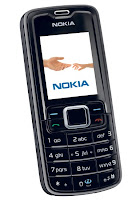 Are you users of the Nokia 3110c? The problems often encountered in mobile Nokia 3110c is the phone can not read MMC, or phone restart when installed MMC.
This can be overcome such as by flashing, but if you do not have Flasher box, you can use the following as alternative steps:
- Remove SIM Card
- Remove the MMC and Format MMC on your computer
- Turn on the phone without SIM Card and MMC
- Return the phone settings to factory settings
- Enter the MMC, and then format MMC by phone, then reset the phone
- Then insert the SIM card, then reset the phone
- Mobile return to normal

Monday, November 17, 2014
nokia Asha 200 Camera Problem Solution Jumper Ways
if Nokia Asha 200 camera is not working we can not take pictures and make video from Nokia Asha 200.for making video or taking snaps it is to much necery that we solve Nokia Asha 200 camera problem so that it can be used for taking snaps and photos.
![]()
to solve Nokia Asha 200 camera switch button we can follow steps as given in above diagram.first remove camera from jack and check its points may they have some carbon or water damage so clean these point with electronics cleaner and aplly some hot air to dry board.
then check all these track as shown with differnent colors in above diagram.all these colores define path and track and parts which are used in camera function.so if any link is broken apply jumpers and parts are missing or damag replace them to solve Nokia Asha 200 camera not working problem solution.
for more detail and new tips and tricks about cellphone service problem keep visiting this page we will update daily this blog timely with other mobile solution.
to solve Nokia Asha 200 camera switch button we can follow steps as given in above diagram.first remove camera from jack and check its points may they have some carbon or water damage so clean these point with electronics cleaner and aplly some hot air to dry board.
then check all these track as shown with differnent colors in above diagram.all these colores define path and track and parts which are used in camera function.so if any link is broken apply jumpers and parts are missing or damag replace them to solve Nokia Asha 200 camera not working problem solution.
for more detail and new tips and tricks about cellphone service problem keep visiting this page we will update daily this blog timely with other mobile solution.
Saturday, November 15, 2014

Nokia X3 Display problem solution Full Display IC Jumper ways
Heres a full display problem solution for Nokia X3, If you ever having tried to replace a new LCD module replacement and updating the firmware by only trying to fix a Display problem, like White Lcd, Blue Lcd, blank Lcd, garbled, saturated and etc on X3. but the display problem still unsolved.This solution below shows the connection of display ESD filter IC to each certain pins of the B2B connector.

Nokia X3 display problem solution

Nokia X3 display IC line tracks
If the the Display ESD filter chip is damaged this will result to display problem issues. By replacing them will only possibly solved the problem. Nokia 2690 White Screen Blue and Blank Screen LCD Display Problem Solution
Heres a solution that may possibly help fix and repair Nokia 2690 LCD Display problems like white Lcd, blue Lcd, black or blank Lcd displays. If youre having tried to replace a new LCd display module replacement when trying to repair display problem on Nokia 2690 but nothing happens and the problem still exists. This solution below shows the connection of LCD display data signals from the application processor chip to each single pins of the LCD connector.
 The solution above shows a detailed information of the display data signal being feeds from the application processor IC to the LCD display pin connector. Each line is been filtered by a resistor that has resistance value of 33ohms each. You may check each resistor and trace each particular line paths, replace the resistor if found damaged or by then apply a jumper for an open line or cut connections.
2690 LCD display connection line tracks ( display jumper ways)

Friday, November 14, 2014
Nokia C2 08 Insert sim ways problem solution jumpers
Nokia C2-08 insert sim problem, Sim is not working in Nokia C2-08, Sim is not Valid, Single Sim is not working in Nokia C2-08
Tools:-
Nokia T4 and T5 key, Electronic meter, Electronics Cleaner, Hot Air, Solding Iron, Jumper Wire.

Diagnostic and Solutions.
if sim is not working in Nokia C2-08 is can be cause of water damage or missing components. Use different sim and if sim is not working then de assemble Nokia C2-08.
Once Mobile phone is disassemble check all these parts that are given in above diagram and apply electronics cleaner. Apply hot air so that it can be dry but not to much because it can damage the mother board or may can harm your skin.
these different color lines are indicating different path and tracks that are used in sim function in Nokia C2-08 so if nay of them is missing apply that jumper as shown in diagram to solve insert sim problem in Nokia C2-08
If single sim is not working out of these two you can only jumper those parts that are used by it. And to find prints and track you can see above diagram.
Warnings:
Do not apply to much heat it can damage the mother board and harm your skin.
When apply jumpers make sure the do not be ground with other prints.It can short the mobile phone.
Remove Sim Ic with hot air because with Solding iron it might can damage prints also.
for more detail and new tips and tricks about cellphone service problem keep visiting this page we will update daily this blog timely with other mobile solution.
Tools:-
Nokia T4 and T5 key, Electronic meter, Electronics Cleaner, Hot Air, Solding Iron, Jumper Wire.
Diagnostic and Solutions.
if sim is not working in Nokia C2-08 is can be cause of water damage or missing components. Use different sim and if sim is not working then de assemble Nokia C2-08.
Once Mobile phone is disassemble check all these parts that are given in above diagram and apply electronics cleaner. Apply hot air so that it can be dry but not to much because it can damage the mother board or may can harm your skin.
these different color lines are indicating different path and tracks that are used in sim function in Nokia C2-08 so if nay of them is missing apply that jumper as shown in diagram to solve insert sim problem in Nokia C2-08
If single sim is not working out of these two you can only jumper those parts that are used by it. And to find prints and track you can see above diagram.
Warnings:
Do not apply to much heat it can damage the mother board and harm your skin.
When apply jumpers make sure the do not be ground with other prints.It can short the mobile phone.
Remove Sim Ic with hot air because with Solding iron it might can damage prints also.
for more detail and new tips and tricks about cellphone service problem keep visiting this page we will update daily this blog timely with other mobile solution.
Nokia 5230 memory card corrupted MMC problem solution
Memory Card Problem in Nokia 5230 can be solve with a few steps that are given in this post.you can see diagram bellow and do same steps as give.in case of MMC Nokia 5230 will not be able to show Memory Card and will not be able play data in memory card.
![Nokia]()
to solve memory card problem view all parts and tracks as given in diagram above.memory card tracks shown in different colors and you can see path easily.resold mmc ic and if not work replace it with new one.
for more detail and new tips and tricks about cellphone service problem keep visiting this page we will update daily this blog timely with other mobile solution.
to solve memory card problem view all parts and tracks as given in diagram above.memory card tracks shown in different colors and you can see path easily.resold mmc ic and if not work replace it with new one.
for more detail and new tips and tricks about cellphone service problem keep visiting this page we will update daily this blog timely with other mobile solution.
Thursday, November 13, 2014


Wednesday, November 12, 2014
NOKIA N8 SPEAKER PROBLEM
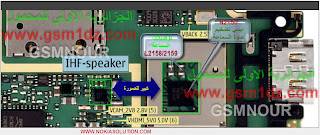 NOKIA N8 SPEAKER PROBLEM:
SPEAKER PROBLEM IS A COMMON PROBLEM FOR ANY CELL PHONE , HERE IS SOLUTION IMAGE FOR NOKIA N8 SPEAKER PROBLEM.
Nokia 110 No Power On with Battery Problem Solution
1-Nokia 110 is not getting power on with battery.
2-Nokia 110 is dead and not getting power on with battery.
3-But it can be switch on with direct power suplly of 4v.

Tools:-
To solve this problem you should have
1-Any electronics cleaner.
2-Hot Air Machine.
3-Solding Iron.
4-And same mother board if a few components required.
Solution:-
1-Check Nokia 110 with new battery and try to switch on.
2-If it can not be power on with battery then check with Power Supplu.
3-Disassamble Nokia 110 and look at mother board very carefully.
4-If there is some rust or carbon on board then clean it with electronics cleaner.
5-Apply hot air with Hot air gun. Here should not be much heat because it can harm you and Mobile
Phone.
6-Check Mobile phone with battery if it can be power on with it.
7-If not working with above process then change these parts as shown in above diagram.
Warnings:-
1-Do not apply to much heat it can be harm for your skin and mobile.
2-Do not apply to much cleaner it can be cause of rust or carbon if you do not make your phone dry.
for more detail and new tips and tricks about cellphone service problem keep visiting this page we will update daily this blog timely with other mobile solution.
2-Nokia 110 is dead and not getting power on with battery.
3-But it can be switch on with direct power suplly of 4v.
Tools:-
To solve this problem you should have
1-Any electronics cleaner.
2-Hot Air Machine.
3-Solding Iron.
4-And same mother board if a few components required.
Solution:-
1-Check Nokia 110 with new battery and try to switch on.
2-If it can not be power on with battery then check with Power Supplu.
3-Disassamble Nokia 110 and look at mother board very carefully.
4-If there is some rust or carbon on board then clean it with electronics cleaner.
5-Apply hot air with Hot air gun. Here should not be much heat because it can harm you and Mobile
Phone.
6-Check Mobile phone with battery if it can be power on with it.
7-If not working with above process then change these parts as shown in above diagram.
Warnings:-
1-Do not apply to much heat it can be harm for your skin and mobile.
2-Do not apply to much cleaner it can be cause of rust or carbon if you do not make your phone dry.
for more detail and new tips and tricks about cellphone service problem keep visiting this page we will update daily this blog timely with other mobile solution.
Tuesday, November 11, 2014
Nokia 5800 memory card corrupted MMC problem solution
Memory Card Problem in Nokia 5800 can be solve with a few steps that are given in this post.you can see diagram bellow and do same steps as give.in case of MMC Nokia 5800 will not be able to show Memory Card and will not be able play data in memory card.

to solve memory card problem view all parts and tracks as given in diagram above.memory card tracks shown in different colors and you can see path easily.resold mmc ic and if not work replace it with new one.
for more detail and new tips and tricks about cellphone service problem keep visiting this page we will update daily this blog timely with other mobile solution.
to solve memory card problem view all parts and tracks as given in diagram above.memory card tracks shown in different colors and you can see path easily.resold mmc ic and if not work replace it with new one.
for more detail and new tips and tricks about cellphone service problem keep visiting this page we will update daily this blog timely with other mobile solution.

Friday, November 7, 2014
Nokia Asha 200 MMC Memory Card Problem Solution Ways Jumpers
if Memory Card MMC is not working proper in nokia asha 200 or having fault inset Memory Card or Memory Card is not inserted etc problem then here is diagram

that will help you to solve this issue all parts that are shown in diagram with blue lines and box are used in mmc function so resold these parts and if problem not solve then replace these parts it will help you to solve memory card problem in nokia asha 200.
that will help you to solve this issue all parts that are shown in diagram with blue lines and box are used in mmc function so resold these parts and if problem not solve then replace these parts it will help you to solve memory card problem in nokia asha 200.
Wednesday, November 5, 2014
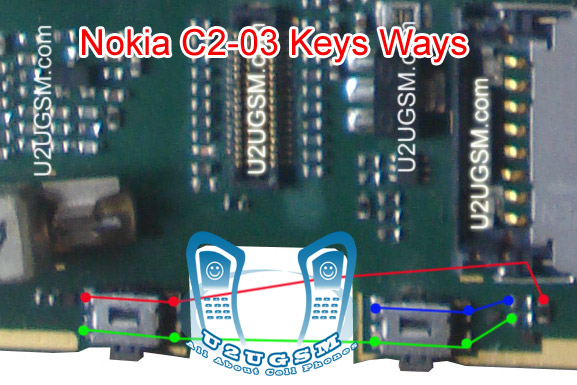
Nokia C2 08 Voluem Up Down Keys Not Working Problem Solution Jumpers
1-Nokia C2-08 Volume Up Key is Not Working.
2-Nokia C2-08 Volume Down Key is Not Working.
Tools:-
1-Hot Air is required.
2-Solding iron is required.
3-Skrue driver keys.
4-Electronics cleaner.
5-Four leg On of Switch ( Volume Key Switch ).
6-old board of Nokia C2-08 if a few parts are damage in this board.So that they can be replaced.

Solution:-
If Volume Up or Down key is not working in Nokia C2-08 then it can be the cause of Volume Switch or Resistance near by it.
So disassemble mobile phone and check whole mother board.
If there is some rust or carbon clean it with electronics cleaner and apply some heat so that it can be dry.
Check these tracks as shown in red and green lines in above diagram.
If some prints are missing or a few parts are damage apply jumpers or replace damaged parts.
If Volume Switch is damage or broken then replace it with new one.
Warnings:
Do not apply much heat it can be harm for your skin and mobile phone.
Try that board get fully dry.
When you are removing old volume switch make sure you will not damage prints from mother board so remove it when solding iron is too much hot.Or remove it with hot air.
2-Nokia C2-08 Volume Down Key is Not Working.
Tools:-
1-Hot Air is required.
2-Solding iron is required.
3-Skrue driver keys.
4-Electronics cleaner.
5-Four leg On of Switch ( Volume Key Switch ).
6-old board of Nokia C2-08 if a few parts are damage in this board.So that they can be replaced.
Solution:-
If Volume Up or Down key is not working in Nokia C2-08 then it can be the cause of Volume Switch or Resistance near by it.
So disassemble mobile phone and check whole mother board.
If there is some rust or carbon clean it with electronics cleaner and apply some heat so that it can be dry.
Check these tracks as shown in red and green lines in above diagram.
If some prints are missing or a few parts are damage apply jumpers or replace damaged parts.
If Volume Switch is damage or broken then replace it with new one.
Warnings:
Do not apply much heat it can be harm for your skin and mobile phone.
Try that board get fully dry.
When you are removing old volume switch make sure you will not damage prints from mother board so remove it when solding iron is too much hot.Or remove it with hot air.
Nokia 5250 Battery Terminal Points Damage Ways Problem Solution
Nokia 5250 Battery Terminal Points Damage Ways Problem Solution if in Nokia 5250 during changing battery terminal points you have loss battery points then you can solve this problem with this diagram bellow posted in this post.

there are three different color lines in this post shows that how you can make jumpers so check these links with meter and if any of them is broken make these jumpers with insulation wire.this diagram can help you in case Nokia 5250 is dead you can check these links so that battery crunt can pass through right ways and can be set on off.
for more detail and new tips and tricks about this problem keep visiting this page we will update it timely with new diagrams.some related post are also given bellow you can read them also for more information.
there are three different color lines in this post shows that how you can make jumpers so check these links with meter and if any of them is broken make these jumpers with insulation wire.this diagram can help you in case Nokia 5250 is dead you can check these links so that battery crunt can pass through right ways and can be set on off.
for more detail and new tips and tricks about this problem keep visiting this page we will update it timely with new diagrams.some related post are also given bellow you can read them also for more information.
Nokia 5230 Not Charging solution no response problem solution
if we plug in charger into Nokia 5230 charging jack and it shows not charging instead of saving charging.it can be fault of charging jack or may be due to some parts.some time it can be cause of charger.so in first step replace charger and if problem will not solve then dis assemble mobile phone.Nokia 5250 Speaker Ere Peace Not Working Problem Solution Jumpers

check whole board for rust carbon or water damage clean mother board and apply hot air so that it can be dry complete.positive link is shown with red line and green is to define ground.ground can be jumper with any ground point while in positive path you can check all parts and links if any link is not working apply jumper and if it is needed then replace parts those are missing or damage.
for more detail and new tips and tricks about cellphone service problem keep visiting this page we will update daily this blog timely with other mobile solution.
check whole board for rust carbon or water damage clean mother board and apply hot air so that it can be dry complete.positive link is shown with red line and green is to define ground.ground can be jumper with any ground point while in positive path you can check all parts and links if any link is not working apply jumper and if it is needed then replace parts those are missing or damage.
for more detail and new tips and tricks about cellphone service problem keep visiting this page we will update daily this blog timely with other mobile solution.
Tuesday, November 4, 2014
Nokia C2 01 Handsfree Problem Solution No voice in headset
If you are facing hand free problem in Nokia C2-01 it can be solve with a few steps that I am going to post in this post. If hand free is open you will see a notification of hands fee in Nokia C2-01 while handfree is not plugged in.

To solve Nokia C2-01 Hendfree problem make jumpers that is identified with red line.you can apply jumper as shown in above diagram and in above diagram you can find jumper in red line.
Once you apply jumper hand free problem will be solve. And if it cannot be solve with applying jumper you can replace hands free jack.
for more detail and new tips and tricks about cellphone service problem keep visiting this page we will update daily this blog timely with other mobile solution.
To solve Nokia C2-01 Hendfree problem make jumpers that is identified with red line.you can apply jumper as shown in above diagram and in above diagram you can find jumper in red line.
Once you apply jumper hand free problem will be solve. And if it cannot be solve with applying jumper you can replace hands free jack.
for more detail and new tips and tricks about cellphone service problem keep visiting this page we will update daily this blog timely with other mobile solution.
Monday, November 3, 2014
Nokia 110 Local Test Mode Problem Solution Jumper Solution
some time we get test mode local problem in our mobile display and in this case we can not use cell

phone keypad and other functions.if you have same problem then diagram bellow will help you to solve
this problem. In above diagram you can see a red line box to show the exact location of resistance
which is used in problem solution of test mode in nokia 110.
Once phone has been disassembled you can clean whole mother board for rust or carbon.Leave it to dry
and apply hot air.Replace indicated resistance and also check components behind battery terminals.
for more detail and new tips and tricks about cellphone service problem keep visiting this page we will update cellphone service diagrams timely with new cellphone diagrams.some related post are also given bellow you can read them also for more information about cellphone.
Read More..
phone keypad and other functions.if you have same problem then diagram bellow will help you to solve
this problem. In above diagram you can see a red line box to show the exact location of resistance
which is used in problem solution of test mode in nokia 110.
Once phone has been disassembled you can clean whole mother board for rust or carbon.Leave it to dry
and apply hot air.Replace indicated resistance and also check components behind battery terminals.
for more detail and new tips and tricks about cellphone service problem keep visiting this page we will update cellphone service diagrams timely with new cellphone diagrams.some related post are also given bellow you can read them also for more information about cellphone.
Nokia 5250 Charging Problem Solution Jumpers Ways
nokia 5250 if it is not charging ok and you have not charging problem in nokia 5250 then you can solve this problem with help of diagram bellow. in this diagram all charging links are identified so that you can understand which parts are used in charging function in nokia 5250.

So one print is ground it is identified in diagram with blue color and red cooler is a positive print and you can check all track with meter and if any of them is broken you can apply jumper as defined in repairing diagram.mostly if we plug in charger and it does not show any thing it can be fault of charging base or may be fault of broken link. so check charging base also.
If it shows not charging indication or a message charger not supported then it can be fault of charging ic or may be due to 47k resistance. About these problems I will post in upcoming days.
for more detail and new tips and tricks about cellphone service problem keep visiting this page we will update cellphone service diagrams timely with new cellphone diagrams.some related post are also given bellow you can read them also for more information about cellphone.
So one print is ground it is identified in diagram with blue color and red cooler is a positive print and you can check all track with meter and if any of them is broken you can apply jumper as defined in repairing diagram.mostly if we plug in charger and it does not show any thing it can be fault of charging base or may be fault of broken link. so check charging base also.
If it shows not charging indication or a message charger not supported then it can be fault of charging ic or may be due to 47k resistance. About these problems I will post in upcoming days.
for more detail and new tips and tricks about cellphone service problem keep visiting this page we will update cellphone service diagrams timely with new cellphone diagrams.some related post are also given bellow you can read them also for more information about cellphone.
Subscribe to:
Posts (Atom)
